Microsoft CA can be configured to allow Subject Alternative Name (SAN) values in enrollment requests and include them in the issued certificates.
If you don't enable this feature, you will lose the capability to extend the SAN attributes of the issued certificates with SAN from the certificate request.
Security risks of allowing SAN fields in enrollment requests
Allowing Subject Alternative Name (SAN) fields in enrollment requests creates a serious security risk. Once enabled, any certificate template may accept alternate names regardless of how the template defines the subject. An attacker could exploit this to obtain a certificate with an alternate name and impersonate another user.
For this reason, the CA must limit enrollment permissions to only trusted accounts. Specifically, the security model described in Installing the Entrust Proxy for Microsoft CA focuses on allowing only the Proxy Admin to have enrollment permission.
Enabling the Config_CA_Accept_Request_Attributes_SAN flag
If you want Microsoft CA to accept Subject Alternative Name (SAN) fields in enrollment requests, enable the following flag.
Config_CA_Accept_Request_Attributes_SANTo enable Config_CA_Accept_Request_Attributes_SAN flag
- Log in to the Windows machine hosting the Microsoft CA server.
- Run the
regeditcommand to open the Registry Editor. Select the following registry key (
<CA_CN>is the Common Name of the Microsoft CA).HKLM/SYSTEM/CurrentControlSet/Services/CertSvc/Configuration/<CA_CN>/PolicyModules/CertificateAuthority_MicrosoftDefault.Policy/EditFlagsCalculate an OR of the current key value and
0x000040000. For example, if the current value is11014e, calculate:0x00011014e OR 0x000040000 = 0x0015014e- Set the OR result as the new key value.
- Run the
certsrvcommand to display the CA service settings.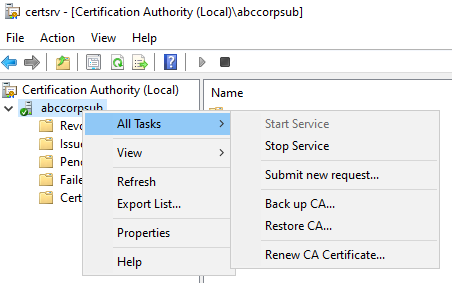
- In the navigation tree, right-click the CA name.
- Select All Tasks > Stop service to stop the Microsoft CA server.
- Select All Tasks > Start service to restart the Microsoft CA server.