A Cloud VM Set is a logical grouping of related VMs, such as "Amazon EC2 VMs," "Azure VMs," and "Legal Dept VMs". When you register a new VM with Cryptographic Security Platform Vault, you must assign that VM to a Cloud VM Set before the data can be encrypted.
When you create a Cloud VM Set, you can specify default properties that are inherited by every VM that is registered with that set. These default properties can be overridden at the individual VM level if required.
If Cryptographic Security Platform Vault has access to a hardware security module (HSM), the Cloud VM Set can also be associated with a Key Encryption Key (KEK) that provides an extra layer of security and that can be used to expire or revoke access to all VMs in the set automatically. For more information, see KEKs with Cloud VM Sets.
Each Cloud VM Set is associated with a specific Cloud Admin group, and that group is, in turn, associated with one or more Cryptographic Security Platform Vault accounts with Cloud Admin privileges.
This structure allows you to create boundaries between your VM groups so that Cloud Admins from one group cannot see the VMs assigned to a different group.
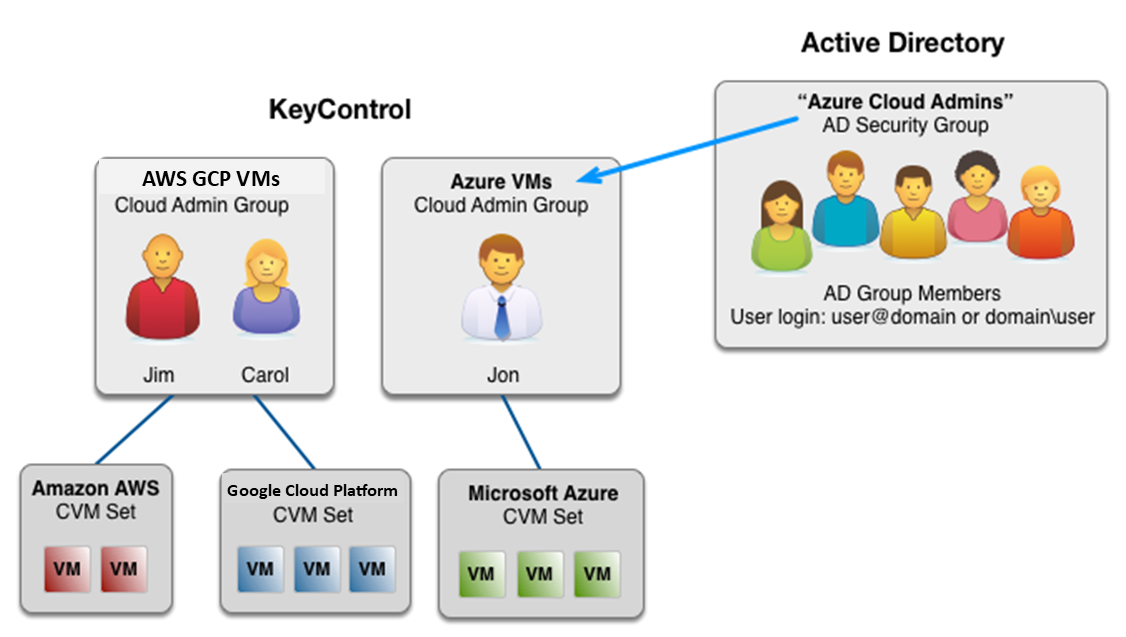
The following figure shows an example of the relationship between Cryptographic Security Platform Vault users, Cloud Admin Groups, and Cloud VM Sets. In this example:
- Jim and Carol both have Cryptographic Security Platform Vault-managed user accounts assigned to the Cloud Admin Group "AWS GCP VMs". They are responsible for the VMs in the Cloud VM Sets "Amazon AWS" and "Google Cloud Platform". When they log in, they cannot see any of the VMs that have been registered with the "Microsoft Azure" Cloud VM Set.
- Jon has a Cryptographic Security Platform Vault-managed user account, and both his account and the Active Directory Security group "Azure Cloud Admins" have been assigned to the Cloud Admin Group "Azure VMs". Jon and all the members of the AD Security group are responsible for the VMs in the Cloud VM Set "Microsoft Azure". When Jon or any of the AD Security group members log into Cryptographic Security Platform Vault, they can only see the VMs in the "Microsoft Azure" Cloud VM Set.
For more information about Cloud Admin groups and user accounts, see Cloud Admin Groups and CSP Vault User Accounts.